Palette variants
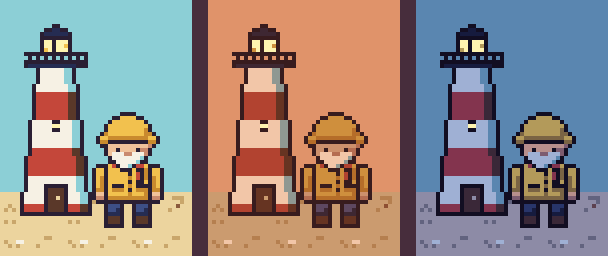
You'll take one drawing of a lighthouse keeper on his beach and render it three ways: by day, at dusk, and at night, without redrawing a single pixel.
The idea
A .px sprite doesn't store colors. It stores letters, one per pixel. Here are a few
rows from the lighthouse in coast.px:
.......kwwwwwwcck.......
......krrrrrrrrOOk......
......krrrrrrrrOOk......A palette says which color each letter means. In palette.px, w
is the whitewash and r the red stripes:
w #f6f1e4
r #c4473a
A variant is a second set of colors for the same letters. palette.px also has a
night variant, where w becomes a moonlit blue and r a dark plum. The drawing stays
the same, so you get the night version for free.
Before you start
From this folder, copy just the source files into a new folder of your own and go there. The commands below then make every output fresh, and print exactly what's shown here:
mkdir -p ~/pxart-03
cp coast.px palette.px ~/pxart-03/
cd ~/pxart-03
~ is your home folder, and -p keeps mkdir quiet if the folder is already there.
The examples README says how to make pxart a command you can type.
Step 1: Look at the palette
Open palette.px in any text editor. Each color is one line: a letter,
then a hex color. The # lines above them are comments that say what each letter is
for:
# whitewash, beard
w #f6f1e4
# red stripes, scarf
r #c4473a
# lamp light (stays lit at night)
l #fff4b0
coast.px doesn't list any colors itself. Its line @palette palette.px borrows all
of them from this file, the way a whole set of sprites can share one palette.
Step 2: Render the daytime scene
coast.px holds three pictures (pxart calls them frames): lighthouse, keeper
and sand. The scene command places frames on a canvas and saves a PNG:
pxart scene --size 48x64 --bg '#8ccfd6' -o base.x4.png \
  coast.px:sand@0,48 coast.px:sand@16,48 coast.px:sand@32,48 \
  coast.px:lighthouse@2,6 coast.px:keeper@16,26
What each piece means:
--size 48x64is the canvas size in pixels: 48 wide, 64 tall.--bg '#8ccfd6'fills the canvas with a sky color first. The quotes stop the shell from reading#as the start of a comment.-o base.x4.pngis the output file.coast.px:sand@0,48means "thesandframe fromcoast.px, with its top-left corner at x=0, y=48". The sand tile is 16 pixels wide, so three of them cover the bottom of the canvas. Later items are drawn on top of earlier ones.
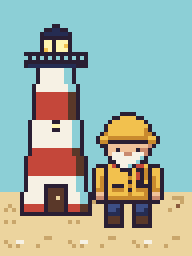
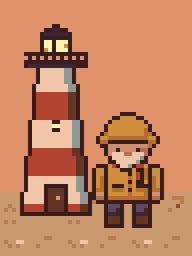
scene draws every pixel as a 4x4 block by default, so the 48x64 scene comes out
192x256 and you can see it:
Step 3: Render the night
Scroll to the bottom of palette.px and you'll find the night variant. It starts with
@variant night, and every letter after that gets a new color:
# night: cool moonlight; lamp colors (l, g) stay lit
@variant night
k #120e22
w #9fb0d4
...
l #fff4b0
g #ffc861
Most colors get darker and bluer. The lamp's two letters, l and g, are listed with
the same colors as in the day palette. That's how you keep something lit: the lamp
still shines at night.
To use a variant, add %night after the frame name. The rest of the command is the
same as Step 2, with a darker sky:
pxart scene --size 48x64 --bg '#5a86b0' -o night.x4.png \
  coast.px:sand%night@0,48 coast.px:sand%night@16,48 coast.px:sand%night@32,48 \
  coast.px:lighthouse%night@2,6 coast.px:keeper%night@16,26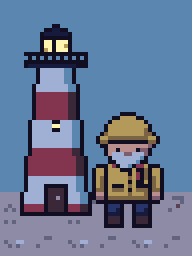
Step 4: Let pxart make a dusk
Picking seventeen night colors by hand is work. For dusk, we'll have pxart work them out from the day colors instead.
This changes palette.px, so first put copies of both files in a new folder called
derived. The originals stay as they were, and you can start over any time:
mkdir -p derived
cp palette.px coast.px derived/
Now make a variant called dusk in the copy:
pxart palette derived/palette.px --variant dusk --derive-from base \
  --darken 0.2 --tint '#ff6a3a38' --keep-lit l,g
What each piece means:
--variant dusknames the new variant.--derive-from basestarts every letter from its daytime color (the base palette).--darken 0.2makes every color 20% darker.--tint '#ff6a3a38'then lays a sunset orange over each color. The last two digits,38, are how see-through the orange is:00is invisible,ffis solid.--keep-lit l,gleaves the lamp's two letters alone, so the lamp stays lit.
pxart prints what it did:
new @variant dusk; derived from base (darkened 20%, tinted #ff6a3a38): recolors 15 key(s); l g kept lit (in their base colors); k N O held no brighter than their base colors by Rec. 709 luma (darker than a quarter: an outline stays dark; --lift-darks lets the derive brighten them); wrote derived/palette.pxA key is pxart's word for a letter in the palette. So: fifteen letters got new colors, the lamp was kept lit, and the three darkest letters (the outline and two shadows) were not allowed to get lighter, so outlines stay crisp. (Rec. 709 luma is the standard way to measure how bright a color looks.)
Render it from the copy, with %dusk and a sunset sky:
pxart scene --size 48x64 --bg '#e0936a' -o dusk-derived.x4.png \
  derived/coast.px:sand%dusk@0,48 derived/coast.px:sand%dusk@16,48 derived/coast.px:sand%dusk@32,48 \
  derived/coast.px:lighthouse%dusk@2,6 derived/coast.px:keeper%dusk@16,26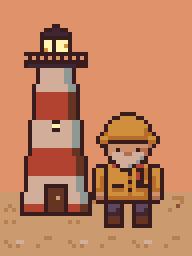
Step 5: Tweak one color by hand
The automatic dusk is close, but the whitewash on the lighthouse looks grey. In a real
sunset a white wall would glow peach. Set just that one letter, w, in the dusk
variant:
pxart palette derived/palette.px --variant dusk --add 'w=#f2c6a8'@variant dusk; sets w #f2c6a8; wrote derived/palette.px--add sets a letter's color. With --variant dusk in front, it changes only the
dusk colors; the day and night stay as they were.
Render the dusk again (the same command as Step 4, with a new output name):
pxart scene --size 48x64 --bg '#e0936a' -o dusk.x4.png \
  derived/coast.px:sand%dusk@0,48 derived/coast.px:sand%dusk@16,48 derived/coast.px:sand%dusk@32,48 \
derived/coast.px:lighthouse%dusk@2,6 derived/coast.px:keeper%dusk@16,26| Before the tweak | After |
|---|---|
|
 |
Step 6: See what each variant changes
palette with just a file name and no other options lists the palette:
pxart palette derived/palette.pxIt prints every letter with its color and comment, then one line per variant
(trimmed here; the whole listing is in palette.txt):
w #f6f1e4     local  # whitewash, beard
...
l #fff4b0     local  # lamp light (stays lit at night)
g #ffc861     local  # lamp glow (stays lit at night)
variants: dusk, night
  dusk: recolors (darker) k w s S y Y n N b c a A o O r; relists unchanged: l g; inherits: nothing
  night: recolors (darker) k w s S y Y n N b c a A o O r; relists unchanged: l g; inherits: nothing
    # night: cool moonlight; lamp colors (l, g) stay lit
How to read a variant's line:
- recolors (darker): the letters it gives new colors, all darker than by day.
- relists unchanged: letters it lists in their daytime colors on purpose. Here that's the lamp, kept lit.
- inherits: letters it doesn't mention, which just use the day colors.
nothingmeans every letter is covered.
local means the color is written in this file rather than borrowed from another
palette.
Putting the three side by side
The picture at the top is the three 4x renders laid next to each other on one canvas.
--scale 1 keeps them at the size they already are, and each one is 192 pixels wide,
so they go at x=0, 208 and 416, with a 16-pixel gap between:
pxart scene --size 608x256 --scale 1 -o panels.x4.png \
  base.x4.png@0,0 dusk.x4.png@208,0 night.x4.png@416,0
Try it yourself
- Make a storm. Derive a
stormvariant with more darkening and a grey-green tint, keeping the lamp lit:pxart palette derived/palette.px --variant storm --derive-from base --darken 0.35 --tint '#40584060' --keep-lit l,g. Then render it under a grey sky.--variant stormdraws every item in the storm colors, so the items need no%storm:pxart scene --size 48x64 --bg '#5d6b6e' --variant storm -o storm.x4.png derived/coast.px:sand@0,48 derived/coast.px:sand@16,48 derived/coast.px:sand@32,48 derived/coast.px:lighthouse@2,6 derived/coast.px:keeper@16,26. - Change the night lamp. Give
la warmer color in night only, with--variant night --add 'l=#ffd070', and see how the listing's night line changes. - Label your letters.
palette.px's comments were written with--comment, which takes a letter and some text:pxart palette derived/palette.px --comment b 'open sea'.
Commands used
pxart scene: place frames on a canvas and save a PNG.pxart help scenepxart palette FILE: list a palette and its variants.pxart help palettepxart palette FILE --variant NAME --derive-from base: build a variant from another one's colors.pxart palette FILE --variant NAME --add 'k=#rrggbb': set one letter's color in a variant.
The Commands section of the main README covers all of them.
examples/03-variants/README.md in the repository.Edit on GitHub