Export
You'll turn two .px files into what other tools read: a sprite sheet for Aseprite, a
tileset for Tiled, and a folder of plain PNGs, one per frame.
The idea
A .px file is pxart's own format. Game engines and art tools don't read it, so when a
sprite is ready you export it: pxart writes the pictures as PNGs, and the rest (frame
names, timing, the pivot under the feet) as a JSON file, a text format for data that
almost every tool can load.
Which export you want depends on where the art goes next:
- Aseprite is a popular pixel-art editor. Its sprite-sheet JSON is also read by many game engines and their plugins, so it's a common way to hand over animations.
- Tiled is a level editor. It builds maps from a tileset: one PNG of tiles plus a file describing them.
- Plain frames are one PNG per frame, for anything else.
Before you start
From this folder, copy just the source files into a new folder of your own and go there. The commands below then make every output fresh, and print exactly what's shown here:
mkdir -p ~/pxart-08
cp alchemist.px hero_pal.px harbor.px harbor-palette.px ~/pxart-08/
cd ~/pxart-08
~ is your home folder, and -p keeps mkdir quiet if the folder is already there.
The examples README says how to make pxart a command you can type.
This folder has two sprites: alchemist.px, a character with a
six-frame walk and a five-frame attack, and harbor.px, six 16x16 ground
tiles, two of which animate the water.
Step 1: Export the alchemist for Aseprite
pxart export alchemist.px --aseprite alchemist.json--aseprite alchemist.json names the JSON file. The sheet goes beside it, with the same
name:
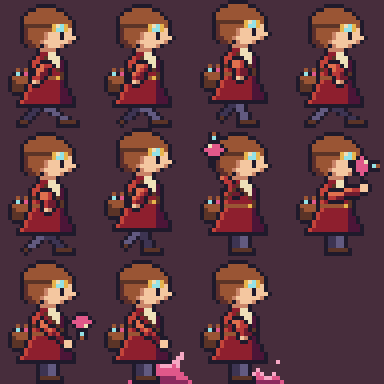
wrote alchemist.png alchemist.jsonalchemist.png is every frame on one 96x96 image, four to a row (the
picture at the top, at 4x). alchemist.json says where each frame is
on it and how long it shows. Its first frame:

{"filename": "walk/right/0", "frame": {"x": 0, "y": 0, "w": 24, "h": 32}, ..., "duration": 100}Then, near the end, the two animations (frameTags) and the pivots (slices):
"frameTags": [
  {"name": "walk/right", "from": 0, "to": 5, "direction": "forward", "color": "#000000ff"},
  {"name": "attack/right", "from": 6, "to": 10, "direction": "forward", "color": "#000000ff", "repeat": "1"}
],
"slices": [{"name": "pivot", "color": "#0000ffff", "keys": [
{"frame": 0, "bounds": {"x": 0, "y": 0, "w": 24, "h": 32}, "pivot": {"x": 12, "y": 31}}, ...- The walk is frames 0 to 5 and the attack 6 to 10, in sheet order.
"repeat": "1"on the attack means it plays once instead of looping. It comes fromrepeat=1on the attack's@animline inalchemist.px.- The pivot, 12,31, is the pixel under her feet, the same
pivot=as in 02 · Animation. Aseprite keeps it as a slice namedpivot.
Step 2: Export the harbor tiles for Tiled
pxart export harbor.px --tiled harbor.tsjwrote harbor.png harbor.tsjharbor.png is the tileset image: the six tiles, three to a row. Here it
is at 8x:

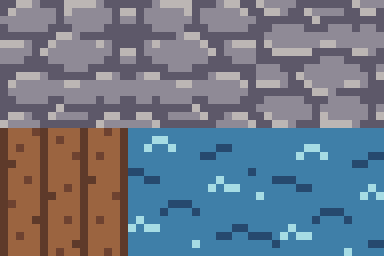
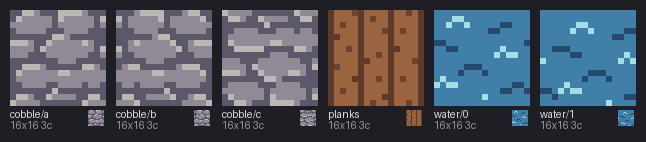
Tiled numbers tiles from 0, in the order they are in the .px file. sheet shows them
in that order, labeled with their frame names: counting from 0, cobble/a to cobble/c
are tiles 0 to 2, planks is 3, and water/0 and water/1 are 4 and 5.
harbor.tsj (a Tiled tileset, in JSON) gives the size of the tiles and
the image, and one more thing: tile 4 animates. It shows tile 4, then tile 5, 450 ms
each, from @anim water ms=450 in harbor.px:
{"id": 4, "animation": [{"tileid": 4, "duration": 450}, {"tileid": 5, "duration": 450}],
 "properties": [{"name": "pxart_anim", "type": "string", "value": "water"}]}
Paint tile 4 into a Tiled map, and its water moves.
Step 3: Export one PNG per frame
pxart export alchemist.px --frames framescreated frames/
wrote 11 PNGs under frames (frames/walk/right/0.png ... frames/attack/right/4.png) frames/pivots.json--frames frames writes into a folder called frames, making it if needed. Each frame's
name is its path: walk/right/0 becomes frames/walk/right/0.png, at its real size,
24x32. Two of them, at 4x:

frames/pivots.json keeps what a PNG can't, the pivot of each frame:
{"walk/right/0": {"x": 12, "y": 31}, ...The pictures
The exported PNGs are 1x, too small to see here, so build.sh scales them up with
scene (and labels the tiles with sheet):
pxart scene --size 96x96 --scale 4 -o alchemist.x4.png alchemist.png@0,0
pxart scene --size 48x32 --scale 8 -o harbor.x8.png harbor.png@0,0
pxart sheet harbor.px --cols 6 --scale 6 -o harbor-tiles.png
pxart scene --size 56x32 -o frames.x4.png frames/walk/right/0.png@0,0 frames/attack/right/3.png@32,0
Try it yourself
- Only the walk.
pxart export alchemist.px:walk/right --aseprite walk.jsonexports just those six frames, aswalk.pngandwalk.json. - Dusk tiles.
harbor-palette.pxhas aduskvariant:pxart export harbor.px --tiled harbor-dusk.tsj --variant duskwrites a dusk tileset beside the day one. - Look inside. Open
alchemist.jsonorharbor.tsjin a text editor. It's all plain text.
Commands used
pxart export FILE --aseprite OUT.json: a sheet PNG and Aseprite JSON.pxart export FILE --tiled OUT.tsj: a Tiled tileset (PNG and JSON).pxart export FILE --frames DIR: one PNG per frame, andpivots.json.
pxart help export has the details. The Commands section of
the main README covers all of them.
examples/08-export/README.md in the repository.Edit on GitHub