Checking
You'll run pxart's checker on a sprite with three mistakes in it, read what it says about each one, and fix them one at a time until it passes.
The idea
A .px file is text you can type, so it can have typos: a row one pixel short, a letter
that isn't in the palette, a letter that only looks like the right one. pxart won't
draw a file with mistakes like these. check reads the whole file and lists every
problem at once, each with the line it's on, so you can go straight there.
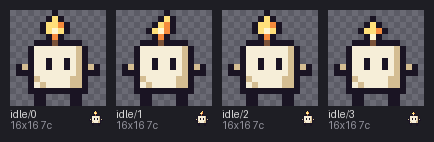
broken.px is Wick the candle, four idle frames, with three mistakes put in
on purpose. fixed.px is the same file without them.
Before you start
From this folder, copy just the source files into a new folder of your own and go there. The commands below then make every output fresh, and print exactly what's shown here:
mkdir -p ~/pxart-09
cp broken.px fixed.px ~/pxart-09/
cd ~/pxart-09
~ is your home folder, and -p keeps mkdir quiet if the folder is already there. You'll edit your copy of broken.px.
The examples README says how to make pxart a command you can type.
You'll also need a text editor that can jump to a line number; most can.
Step 1: Check the file
pxart check broken.pxFAIL broken.px: 3 error(s)
broken.px:41: E_ROW_WIDTH (frame idle/1, row 3): row is 15 wide, but 15 of 16 rows are 16 wide: '.....kfiak.....'
broken.px:63: E_UNKNOWN_KEY (frame idle/2, row 7, x=[7]): keys 'W' aren't in the palette
     broken.px:85: E_UNKNOWN_KEY (frame idle/3, row 11, x=[4]): keys 'с' aren't in the palette
     note: broken.px:85 (frame idle/3, row 11, x=4): 'с' is U+0441 CYRILLIC SMALL LETTER ES, not ASCII 'c'
(exit 1)FAIL and three errors. Each error line has the same parts:
broken.px:41is the file and the line number to go to.E_ROW_WIDTHis the kind of mistake, a fixed name you can look up or search for.(frame idle/1, row 3)says where in the picture: which frame, and which row of its grid. Rows andx(the column) count from 0.- The rest says what's wrong.
(exit 1) means check failed, which a script can test for. The steps below fix the
errors in order.
Step 2: A row one pixel short
broken.px:41: E_ROW_WIDTH (frame idle/1, row 3): row is 15 wide, but 15 of 16 rows are 16 wide: '.....kfiak.....'Every row of a frame must be the same width. This frame's rows are 16 letters wide,
except row 3, which has 15. Go to line 41 of broken.px and add one . at the end:
.....kfiak......Save, and check again:
pxart check broken.pxFAIL broken.px: 2 error(s)
...One down. (The ... stands for the remaining errors, listed again as in Step 1.)
Step 3: A letter that isn't in the palette
broken.px:63: E_UNKNOWN_KEY (frame idle/2, row 7, x=[7]): keys 'W' aren't in the paletteA key is a palette letter. The palette at the top of the file has a lowercase w (the
wax), but no capital W, and case matters. Line 63 has a W at x=7, the eighth letter:
...kwwwWwwwck...Make it a w, save, and check again:
pxart check broken.pxFAIL broken.px: 1 error(s)
...Step 4: A letter that only looks right
The last error is the sneaky one:
broken.px:85: E_UNKNOWN_KEY (frame idle/3, row 11, x=[4]): keys 'с' aren't in the palette
note: broken.px:85 (frame idle/3, row 11, x=4): 'с' is U+0441 CYRILLIC SMALL LETTER ES, not ASCII 'c'The file's palette has a c, and line 85 looks like it has one too. But the note says
that letter is a Cyrillic es, from the Russian alphabet, which looks exactly like a
Latin c. That happens when text is pasted from somewhere else, or typed with another
keyboard layout.
Go to line 85, delete the fifth letter (x=4), and type a plain c in its place. Save,
and check once more:
pxart check broken.pxok broken.px: 4 frames, 16x16, 7cok: four 16x16 frames, drawn with 7 colors (7c). Your broken.px is now the same
as fixed.px, apart from the comment on its first line.
Step 5: Look at it
A file that passes check can be drawn. Draw your repaired broken.px:
pxart sheet broken.px --scale 6 -o fixed.pngsheet puts every frame side by side with its name; --scale 6 draws each pixel as a
6x6 block.
Step 6: Count the colors
stats says how big a frame is and which colors it uses. --colors counts the pixels
of each:
pxart stats broken.px:idle/0 --colorsbroken.px:idle/0: 16x16 bbox x 1..14, y 0..15; colors=7 #1a1423 #7a5238 #d4bd92 #f58b3c #f6eed8 #ffe07a #fff6d0
#1a1423 58 px (k)
#f6eed8 41 px (w)
#d4bd92 13 px (c)
...
#fff6d0 1 px (i)bbox is the box around the pixels that aren't empty: x 1..14, y 0..15 is x from 1 to
14 and y from 0 to 15, both ends included (onion prints its boxes the same way). Below it, each color, how many pixels use it, and its key: 58 pixels
of outline k, and a single pixel of i, the bright heart of the flame.
Try it yourself
- One line per frame.
pxart check fixed.px -vprintsokfor each frame. - Break it yourself. Delete the
i #fff6d0line from a copy offixed.pxand check it: every frame with a flame has anithat's no longer in the palette. - In the dark.
fixed.pxhas adarkvariant:pxart sheet fixed.px --scale 6 --variant dark -o dark.png. The flame stays lit.
Commands used
pxart check FILE [-v]: find every mistake in a file, with its line.pxart help checkpxart sheet FILE -o OUT.png: every frame side by side.pxart help sheetpxart stats FILE:FRAME --colors: size and colors.pxart help stats
The Commands section of the main README covers all of them.
examples/09-check/README.md in the repository.Edit on GitHub