Compose across packs
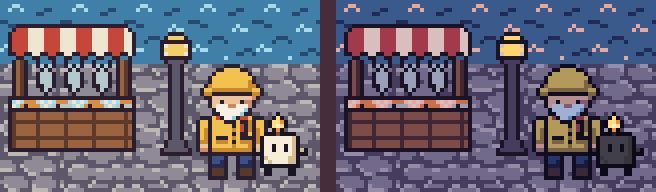
You'll build one scene, a harbor dock with a lighthouse keeper and a candle called Wick, out of three sprite packs that were never meant to go together, and then turn the whole dock to dusk at once.
The idea
A pack here is a folder of sprites that share one palette file. This folder has three:
harbor-market (tiles, a stall, a lamp), lighthouse-keeper
and wick. Each picked its letters on its own, so the same letter means different
colors. Here is k, the outline color, in each palette:
k #2b1e2f
k #2a1f33
k #1a1423
(from harbor-market/palette.px, lighthouse-keeper/palette.px and wick/pal.px: three
slightly different near-blacks.)
compose copies frames from any files into one new .px, and brings their colors with
them. When two packs disagree about a letter, it stops and tells you, and --rekey fixes
it by giving the newcomer's letters unused ones. The packs' own files never change.
Before you start
From this folder, copy just the source files into a new folder of your own and go there. The commands below then make every output fresh, and print exactly what's shown here:
mkdir -p ~/pxart-05
cp -R harbor-market lighthouse-keeper wick ~/pxart-05/
cd ~/pxart-05
~ is your home folder, and -p keeps mkdir quiet if the folder is already there. -R copies the folders with everything in them.
The examples README says how to make pxart a command you can type.
Step 1: Look at the three packs
pxart sheet harbor-market/harbor.px lighthouse-keeper/keeper.px wick/player.px --fit --scale 4 -o packs.pngsheet shows every frame of the three files side by side, each labeled with its name.
(--fit gives each frame a cell its own size; --scale 4 draws each pixel 4x4.)
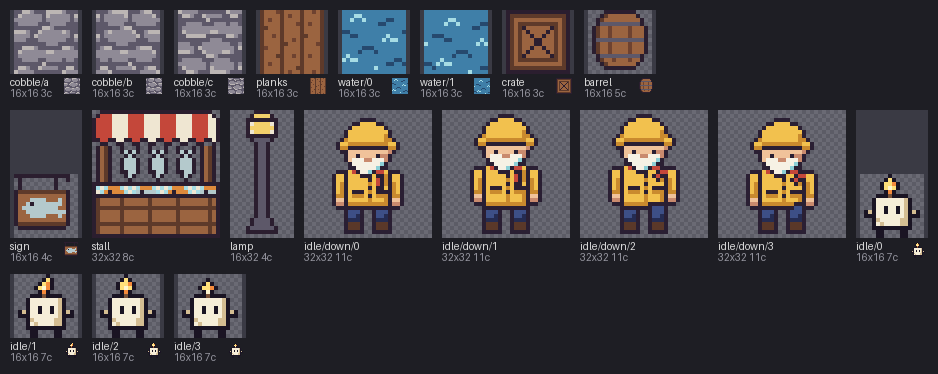
The dock will use the harbor's water/0 and cobble tiles, its stall and lamp, the
keeper's idle/down/0 and Wick's idle/0.
Step 2: List the layers
The dock is 19 frames at 19 positions, the same kind of list scene takes
(FILE:FRAME@x,y, each frame's top-left corner). Store the list in the shell once, so the
next commands can reuse it:
H=harbor-market/harbor.px
layers=(
  ${H}:water/0@0,0 ${H}:water/0@16,0 ${H}:water/0@32,0 ${H}:water/0@48,0 ${H}:water/0@64,0
  ${H}:cobble/a@0,16 ${H}:cobble/b@16,16 ${H}:cobble/c@32,16 ${H}:cobble/a@48,16 ${H}:cobble/b@64,16
  ${H}:cobble/c@0,32 ${H}:cobble/a@16,32 ${H}:cobble/b@32,32 ${H}:cobble/c@48,32 ${H}:cobble/a@64,32
  ${H}:stall@2,6 ${H}:lamp@36,8
  lighthouse-keeper/keeper.px:idle/down/0@42,14 wick/player.px:idle/0@62,28
)H=...is a short name for the harbor file, and${H}pastes it back in.layers=( ... )stores the 19 items as a list."${layers[@]}"in a command pastes all of them, in order.
The order matters: later layers are drawn on top. So the water and cobbles are layers 1 to 15, the stall 16, the lamp 17, the keeper 18 and Wick 19.
Step 3: Try to compose, and read the error
pxart compose -o dock.px --size 80x48 "${layers[@]}" --replace-o dock.pxis the new file;--size 80x48its size in pixels.--replacestartsdock.pxover if it's already there (your copy of this folder has one). Without it, compose would add to the old file's colors.
It fails, with one long line per pack that doesn't fit (cut short here; the whole of it
is in conflict.txt):
compose: layer 18 (lighthouse-keeper/keeper.px:idle/down/0): E_KEY_CONFLICT: 4 keys of this layer are other colors in the new dock.px: 'c' #8ccfd6 (#a6dce4 there, from layer 1 (harbor-market/harbor.px:water/0)), ...
compose: layer 19 (wick/player.px:idle/0): E_KEY_CONFLICT: 5 keys of this layer are other colors in the new dock.px: ...
(exit 1)
How to read the first line: layer 18, the keeper, uses 4 letters that already mean
something else in dock.px. For c, the keeper's color is #8ccfd6, but dock.px
already has #a6dce4 for c, from layer 1, the harbor's water. E_KEY_CONFLICT is the
name of this kind of error (a key is pxart's word for a palette letter).
Each line then ends with the fix: add --rekey.
Step 4: Rekey
pxart compose -o dock.px --size 80x48 --rekey "${layers[@]}" --replace--rekey gives each clashing letter a free one in dock.px, so every pixel keeps its
own color. This time compose prints five notes and then wrote dock.px (all of it is in
rekey.txt). Trimmed here where a note runs long:
note: --rekey gave 12 keys free ones in dock.px: lighthouse-keeper/keeper.px 7, wick/player.px 5 (the files are unchanged)
note: dock.px left out 15 colors for keys some layers don't draw with, and has other layers' colors for them (no conflict): ...
note: 3 of dock.px's variants cover only some layers, the others staying at base colors in each: dusk (harbor-market/harbor.px), night (lighthouse-keeper/keeper.px), dark (wick/player.px); --variant-map dusk=night,dark gives every layer one
note: dock.px gets 8 keys its frame doesn't draw with, from its layers' whole palettes (for shade ramps and recolors): ...
note: that's 10 notes in short; -v prints each in full
wrote dock.px
Each of the first four stands for one kind of note, counted:
--rekey gave ...: how many letters it rekeyed in each pack, 7 of the keeper's and 5 of Wick's.the files are unchanged: only the new file uses the new letters.left out 15 colors ...: the harbor's palette hass S a n, but none of the harbor tiles used here draw with them. The keeper and Wick do, in their own colors, sodock.pxgives those letters the keeper's and Wick's colors. Nothing changes on screen: the harbor layers never used them.variants cover only some layers: this is the one that matters next.gets 8 keys its frame doesn't draw with: spare colors from the packs' palettes, kept indock.pxin case you edit it later.
The last note says these stand for ten. Add -v to the command to see each of the ten
in full (rekey-v.txt has them). Among them, one per pack it rekeyed:
note: --rekey gives wick/player.px's keys free ones in dock.px: 'b>x' 'c>z' 'f>C' 'k>D' 'w>E' (wick/player.px is unchanged)'k>D': Wick's k is written as D in dock.px.
Now look at the dock in its dusk colors. %dusk picks the variant, as in
03 · Palette variants:
pxart scene --size 80x48 -o dock-halfdusk.x4.png dock.px%dusk@0,0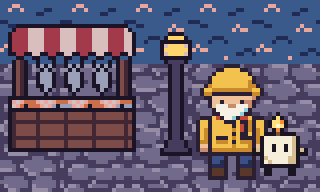
The harbor went dusky, but the keeper and Wick are still in daylight. The third note from before said why:
note: 3 of dock.px's variants cover only some layers, the others staying at base colors in each: dusk (harbor-market/harbor.px), night (lighthouse-keeper/keeper.px), dark (wick/player.px); --variant-map dusk=night,dark gives every layer onedock.px's dusk comes from the harbor alone: each pack calls its darker colors
something else, the harbor's dusk, the keeper's night and Wick's dark, and the
layers of a pack without a dusk stay in their daytime colors in it.
Step 5: One dusk for everyone
Do what the note says:
pxart compose -o dock.px --size 80x48 --rekey --variant-map dusk=night,dark "${layers[@]}" --replace--variant-map dusk=night,dark means: make a dusk in dock.px, and for each layer,
use its pack's dusk, or night if it has none, or else dark. Render the dusk again:
pxart scene --size 80x48 -o dock-dusk.x4.png dock.px%dusk@0,0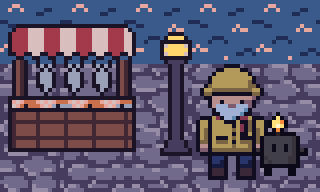
Now all three packs darken together. dock.px is an ordinary sprite file; its first
line, # composed by: pxart compose ..., is the command that made it, so you can make it
again later.
The picture at the top
The daytime dock, then the two renders side by side (--scale 1 keeps them the size
they are; each is 320 pixels wide, so the second goes at x=336, after a 16-pixel gap):
pxart scene --size 80x48 -o dock.x4.png dock.px@0,0
pxart scene --size 656x192 --scale 1 -o panels.x4.png dock.x4.png@0,0 dock-dusk.x4.png@336,0
Try it yourself
- Move Wick. Change
wick/player.px:idle/0@62,28in the list to@24,30, run Steps 2 and 5 again, and render: he's standing by the stall now. - Rekey a copy instead. The end of the keeper's error line in
conflict.txtis apxart recolor lighthouse-keeper/keeper.px ... -o rekeyed/keeper.pxcommand. Run it, putrekeyed/keeper.pxin the list in place oflighthouse-keeper/keeper.px, and compose without--rekey: only Wick's error is left. - Only what's drawn. Add
--used-keys-onlyto Step 5, anddock.pxgets only the letters its pixels actually use: comparepxart palette dock.pxbefore and after.
Commands used
pxart compose -o OUT.px --size WxH [--rekey] [--variant-map NAME=V1,V2] FILE:FRAME@x,y ...: stack frames from any files into one new sprite.pxart help composepxart scene --size WxH -o OUT.png FILE%VARIANT@x,y: render it.pxart help scenepxart sheet FILE... -o OUT.png: every frame side by side.pxart help sheet
The Commands section of the main README covers all of them.
examples/05-compose/README.md in the repository.Edit on GitHub